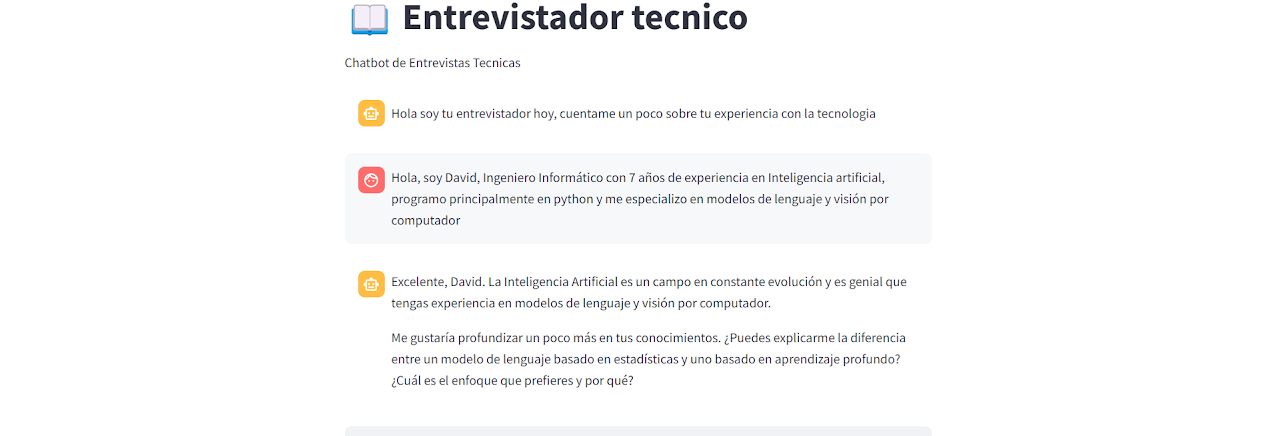
Technical Interview Chatbot
How I Created a Specialized Technical Interview Chatbot

How I Created a Specialized Technical Interview Chatbot
Creating a chatbot for technical interviews might seem complex, but with the right tools, it can be done efficiently and simply. In this article, I'll tell you how I developed a chatbot using LangChain, the Groq API, and Streamlit. Additionally, I deployed it on Streamlit Cloud so anyone could interact with it.
The Objective The purpose of this chatbot is to simulate a technical interviewer. It is designed to:
Ask relevant technical questions based on the user's experience.
Provide feedback on responses.
Continue the conversation with deeper or different questions.
To achieve this, I combined key technologies that allow integrating an advanced language model, managing conversation history, and presenting a user-friendly interface.
Tools and Technologies
LangChain: A framework that facilitates language model integration and message history management.
Groq API: I used Groq's llama-3.1-70b-versatile model, known for handling complex and contextualized conversations.
Streamlit: To create an interactive web interface.
Streamlit Cloud: For easy chatbot deployment.
Code Structure
- Initial Setup
Libraries were imported and API keys configured from.env or Streamlit secrets to ensure protected, production-ready application..
from dotenv import load_dotenv
load_dotenv()
GROQ_API_KEY = st.secrets.get("GROQ_API_KEY")
Additionally, the initial page was set up with st.set_page_config to customize the title and icon.
- Conversation Memory
StreamlitChatMessageHistory was used to manage user and model message history, enabling coherent conversation continuation.
msgs = StreamlitChatMessageHistory(key="langchain_messages")
if len(msgs.messages) == 0:
msgs.add_ai_message("Hola soy tu entrevistador hoy, cuéntame un poco sobre tu experiencia con la tecnología")
This allows the chatbot to remember previous messages and continue the conversation coherently.
- Prompt and Model
The prompt defined the model's behavior as a technical interview expert. The llama-3.1-70b-versatile Groq model was used to ensure advanced, contextualized responses.
prompt = ChatPromptTemplate.from_messages(
[
("system", "Eres un experto en tecnología, y entrevistas técnicas para ingenieros y programadores. Tu misión es ir haciendo preguntas relevantes, ofrecer feedback y continuar con más preguntas."),
MessagesPlaceholder(variable_name="history"),
("human", "{question}"),
]
)
The Groq llama-3.1-70b-versatile model is called using ChatGroq, ensuring advanced and contextualized responses.
- LangChain Integration
RunnableWithMessageHistory connected message flow with the model, maintaining conversation coherence.
chain_with_history = RunnableWithMessageHistory(
chain,
lambda session_id: msgs,
input_messages_key="question",
history_messages_key="history",
)
- User Interface
Streamlit presented message history and an input box for new questions.
if prompt:= st.chat_input():
st.chat_message("human").write(prompt)
response = chain_with_history.invoke({"question": prompt})
st.chat_message("ai").write(response.content)
A PDF export functionality was added for interview performance analysis..
if export_as_pdf:
pdf = FPDF()
pdf.add_page()
pdf.set_font("Arial", size=12)
for msg in msgs.messages:
pdf.multi_cell(0, 10, f"{msg.type}: {msg.content}")
html = create_download_link(pdf.output(dest="S").encode("latin-1"), "tech-interview")
st.markdown(html, unsafe_allow_html=True)
Deployment
I deployed the application on Streamlit Cloud. This allows anyone to access the chatbot without complex configurations.
Conclusion
With tools like LangChain and the Groq API, creating a specialized chatbot is more accessible than ever. This project is useful for its ability to personalize interviews based on user responses. If you want to build a similar chatbot, this code can be an excellent starting point!
Links
GitHub Repo: https://github.com/MrRobert91/StreamlitLLMChatbot
Application Link: https://chatbot-llm-interview.streamlit.app/